Goods Puzzle: 3D Sorting Games
- 4.9
- Rating
- 10.00M
- Installs
- Free
- Price

 Analysis by App-foxy
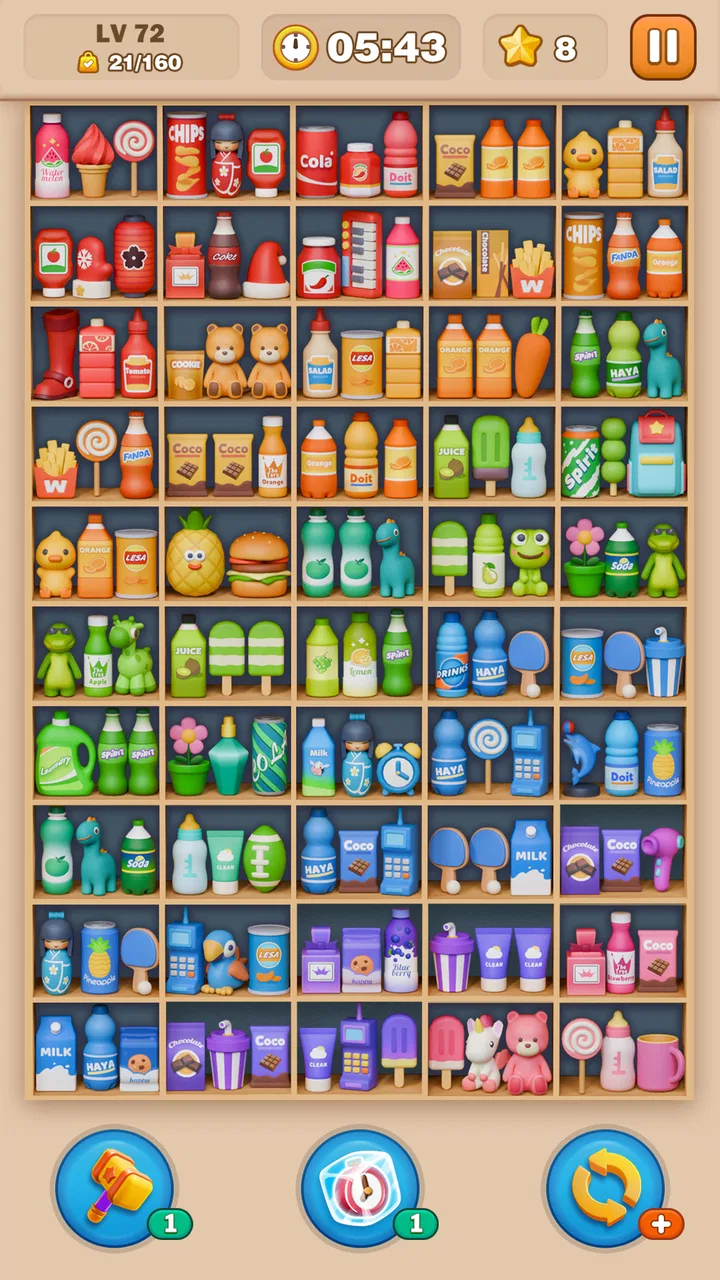
I picked up Goods Puzzle: 3D Sorting Games expecting a simple matching diversion, but it works better as a small shared-device game than I first assumed. The idea is easy to understand: organize three-dimensional goods, make matches, and clear the available space before the board becomes difficult to manage. It belongs to the puzzle category, yet the appeal is less about complicated rules and more about the short decisions you make while sorting a visually busy collection.
That makes it a natural game to leave on a household tablet or phone. One person can play for a few minutes, hand the device over, and let someone else try the next board. I found that the game creates a pleasant kind of informal cooperation, even when only one person is touching the screen. A child may notice a matching item first, while an adult may be better at planning which spaces to free. It is not a multiplayer experience in the usual sense, but it can still become a shared puzzle.
The game is free to download and is rated for Everyone, which makes it approachable for a broad age range. Its developer is Guru Puzzle Game, and the current version is 3.4.0. The store page shows a 4.9 average from around 289 thousand ratings, with more than 10 million installs, so it has clearly reached a large audience. Those figures do not replace personal testing, but they do match my impression that this is designed for quick, accessible play rather than for a narrow group of serious puzzle fans.
You May Also Like

 Blood Strike: 2.5 Anniversary
Blood Strike’s Loadouts Turn Every Drop Into a Tactical Gamble
A close look at Blood Strike’s custom loadouts: how fast access to signature weapons reshapes its battle royale rhythm, rewards preparation, and narrows the gap between fights.

 Pandora - Music & Podcasts
Pandora’s Music Is Easy to Start, but Harder to Recover
Pandora’s strength is its low-effort path from a seed to a station. Its weak spot is how much confidence it asks you to place in connection, setup, and quiet recovery.

 8 Ball Pool
 Is Built on Rivalries, Rematches, and Routine
A close look at the rivalries, rematches, shared routines, and unanswered safety questions that turn a quick pool match into a persistent mobile community.

 Samsung Music
’s Quiet Strength Is Playing What You Already Own
Its reach comes less from spectacle than from dependable access to a personal library. That simplicity is both the app’s strongest retention engine and its ceiling.

 AccuWeather: Weather Radar
AccuWeather Review: A Quick, Clear Forecast for Everyday Decisions
For everyday plans, the best forecast is the one you can understand quickly. AccuWeather makes rain timing, radar, and local conditions easy to act on, with a few trade-offs.

 Hill Climb Racing
Why Hill Climb Racing Still Turns Crashes Into One More Run
A tiny car, a bumpy hill and one more upgrade: Hill Climb Racing keeps resurfacing because its simple chaos makes every near-miss feel personal.
More From Our News Desk
View All News


How the sorting works in everyday play
I find the appeal starts with a small, practical decision: scan the visible goods, pick a matching group, and clear it to make the arrangement easier to read. That first move is also a chance to agree on a plan if someone else is watching, rather than tapping the first match immediately. From there, the changing board gives each choice its own feedback and sets up the next decision.
A simple loop with more planning than it first suggests
The central loop is straightforward: look across a crowded three-dimensional arrangement, identify matching goods, and sort them into groups. The first few decisions feel almost automatic because the visual goal is clear. After that, the challenge comes from choosing what to remove now and what to leave visible for later. A careless match can expose an awkward arrangement, while a patient move can open a useful path through the board.
I like that the game does not require a long tutorial to make sense. Someone unfamiliar with mobile puzzles can understand the objective by watching a round for a moment. That is especially useful on a shared device, where different players may have different levels of patience. You do not need to explain a complicated scoring system before handing the phone to another person.
The three-dimensional presentation also changes how I read the board. In a flat match-three game, the important information is usually arranged on a grid. Here, the objects can feel more like a small pile or display that has to be inspected from the screen. I found myself scanning edges and gaps first, because those areas often reveal the safest next move. This is a small but meaningful difference from ordinary tile-swapping games.
Why it suits short breaks
Goods Puzzle works well when I have only a few quiet minutes. I can start a round without preparing a strategy guide, learning controls, or remembering a complicated story. The sorting theme gives the session a clear purpose, and the match-three structure makes progress immediately understandable. It is the sort of game I would use while waiting for an appointment or taking a short break from a larger task.
That convenience also makes it suitable for passing around at home. A parent can solve a few moves while waiting for dinner, then let a child look for the next matching group. A couple can compare choices without needing to compete directly. On a shared phone, I would still recommend agreeing on who is playing before opening a board, because one person’s careful arrangement can quickly be changed by an enthusiastic helper.
One useful habit is to pause before making the easiest visible match. I often look for the move that exposes the most useful area rather than the group that disappears fastest. This is not an official instruction I would expect every player to follow, but it makes the puzzle feel more deliberate and reduces the frustration of discovering that the next needed object is buried behind a poor choice.
Where the three-dimensional view helps and hurts
The 3D sorting angle gives the game its identity, but it can also introduce visual friction. When several goods have similar shapes or colors, I need a moment to distinguish them. On a small phone screen, that inspection can feel less comfortable than on a larger tablet. I would choose the tablet for shared play because two people can see the arrangement more easily, although the game remains more personal on a phone.
The visual style is also better for players who enjoy scanning and organizing than for people who want a fast reflex challenge. The satisfaction comes from recognizing relationships and managing space. If you prefer rapid swipes, dramatic effects, or a strong competitive ladder, this may feel too calm. Its strength is the tactile sorting fantasy, not speed or spectacle.
Playing together without a formal team mode
For household use, the best approach is to treat the game as a turn-taking puzzle. One player can identify a possible group, another can check whether that move creates a better opening, and the person holding the device can make the final decision. This simple routine prevents the common problem where several people point at different objects at once and nobody knows which plan is being followed.
I also found that explaining the reason for a move makes the game more enjoyable for younger players. Instead of saying “tap those three,” I would say, “let’s clear this group because it lets us see the items behind it.” That turns a casual game into a small lesson in planning without making it feel like homework. It also helps a child understand that the best move is not always the most obvious match.
There is a trade-off here. Shared play can make a simple puzzle feel social, but it can also expose different tolerance levels. One person may want to examine every object, while another wants to keep moving. If your household prefers uninterrupted individual sessions, the game is better treated as a personal pastime. If you enjoy discussing choices, it has enough visual information to support that conversation.
Setting boundaries on a shared device
Because the game is free to download and includes in-app purchases ranging from $0.99 to $99.99 per item, I would set clear household rules before letting a child use it independently. The most important boundary is simple: decide who is allowed to make purchases and whether the device owner must approve anything first. I would not hand over a payment-enabled device without explaining that free installation does not mean every optional transaction is free.
This is less about the puzzle itself and more about responsible shared-device use. A child may understand the sorting rules perfectly while still not understanding the difference between a game action and a purchase. In my home, I would keep the adult responsible for store decisions and let younger players focus on the board. That arrangement avoids confusion and makes the game easier to recommend for occasional family use.
The age rating of Everyone is reassuring for general accessibility, but I would still match play to the child rather than relying on the label alone. Younger children may need help with the visual density of a board and with taking turns. Older children can usually approach the planning independently. The rating tells me the game is broadly suitable; it does not remove the need for ordinary supervision around a shared phone or tablet.
Account separation and progress expectations
A shared device raises another practical question: whose progress is being played? I would decide this before several people begin. If everyone takes turns on the same active game, the household gets a collaborative experience, but individual progress becomes mixed together. If each person wants a separate personal run, the device may not be the best place for that unless the game’s available account and profile options support the separation you need.
I would avoid promising a child that a particular board belongs only to them unless the household has already established how progress is handled. A simple verbal rule works surprisingly well: one person plays until the current attempt ends, then the next person takes over. This keeps the game fair without inventing a complicated family system around a casual puzzle.
The same point matters for adults who use one phone for several people. If you care about preserving your own rhythm and decisions, do not treat the game as an open communal activity. Keep your sessions separate in practice, even if the device itself is shared. If you are happy to let others experiment, the mixed progress can become part of the fun.
Who will enjoy it most
I would recommend Goods Puzzle to players who like organizing objects, spotting patterns, and making low-pressure decisions. It is particularly suitable for someone who wants a match-three game with a sorting theme rather than a story-driven adventure. It can also work for casual players who usually avoid puzzle games because they assume the rules will be difficult to learn.
It is a good choice for a short shared activity between an adult and a child, provided the adult handles store-related decisions and sets a turn-taking rule. It also suits households with a tablet in a common area, where people can look at a board together. The visual objective is clear enough that a non-player can offer suggestions without needing a long explanation.
I would be more cautious about recommending it to someone who wants deep long-term strategy, a competitive ranking focus, or a strong narrative reason to keep playing. The game’s appeal is its repeatable sorting loop. Players who need constant novelty may eventually find that loop familiar. Likewise, anyone who dislikes visually scanning crowded arrangements may prefer a cleaner, flatter puzzle design.
How it compares with familiar puzzle alternatives
Compared with a traditional match-three game built around swapping adjacent tiles, this one asks me to think more about object recognition and clearing space. The satisfaction is closer to arranging a cluttered shelf than lining up jewels on a grid. That makes it a refreshing alternative when ordinary match-three mechanics start to feel predictable.
Compared with a pure sorting game, the match-three element gives each decision a clearer payoff. I am not simply placing items into categories; I am trying to create groups while considering what the next move will reveal. The result feels more active than a basic color-sorting exercise, although it may also be less relaxing for players who prefer completely open-ended organization.
Compared with a large story puzzle game, Goods Puzzle is easier to share casually because there is less context to explain. Nobody needs to remember characters, objectives, or a previous chapter before joining a round. The trade-off is that it offers less emotional variety. I would choose this for a quick household break, not as a replacement for a richer game played over many evenings.
Small techniques that improve the experience
My first practical tip is to scan the outer edges before touching the center. Edge objects are easier to read, and clearing them can make the arrangement less visually crowded. My second is to identify several possible groups before committing to one. Even a brief scan can reveal that the most obvious match is not the most useful match.
My third tip is to use spoken planning when playing with someone else. Say which group you are considering and why, then let the other player challenge the choice before the tap. This turns a solitary board into a cooperative reasoning exercise and reduces accidental moves from people reaching for the screen at the same time.
My fourth is to use the game as a reset between demanding tasks rather than as background noise during them. The board needs enough attention to compare objects, so playing while watching another show can make the experience feel more frustrating. A short, focused session is more satisfying than repeatedly losing track of the arrangement.
Finally, I would keep purchase responsibility with one adult on a shared device. The game is free to start, but the listed optional items can cost from $0.99 to $99.99 each. That range is worth discussing clearly in a household, especially when several people use the same store account. The puzzle itself is accessible; the purchasing boundary should be equally clear.
What the current release means for new players
The game was released on July 16, 2024, and the current version is 3.4.0. It supports devices running Android 7.0 or later, which covers a wide range of phones and tablets. For someone deciding whether to try it, that means the main practical checks are device compatibility, screen comfort, and whether the household is comfortable with optional purchases.
The large install base and strong average rating suggest that the basic concept has broad appeal, but I would still judge it by your preferred puzzle style. A high rating does not make every sorting board enjoyable for every person. If you like visual matching and gradual planning, the game has a clear reason to stay installed. If you want competitive pressure or a story, the same simplicity may feel limiting.
My household verdict
After spending time with it, I see Goods Puzzle as a friendly, easy-to-share sorting game rather than a demanding puzzle marathon. Its best quality is the way a simple match can lead to a small planning discussion: clear this group now, expose the hidden area, and leave enough room for the next decision. That is enough depth for short sessions without turning the game into a commitment.
I would install it on a shared tablet for occasional family play, with an agreed turn-taking rule and an adult handling purchases. I would recommend it to a friend who wants a calm match-three alternative with a more tangible 3D sorting feel. I would skip it for someone who needs a separate profile for every player, intense competition, or a substantial story experience.
For me, the final decision comes down to the balance between accessibility and repetition. The rules are welcoming, the Everyone rating makes the audience broad, and the free entry removes the risk of paying before understanding the loop. At the same time, the visual sorting format will not satisfy every puzzle fan forever. It is at its best when you want a clear, cooperative little challenge that fits naturally into everyday household downtime.
That combination makes it worth trying, especially if your phone or tablet regularly passes between family members. Just decide whose turn it is, who controls purchases, and whether progress is shared before the first board begins. With those boundaries in place, the game becomes an uncomplicated way to compare observations, practice planning, and enjoy a few minutes of sorting together.
FAQs for Goods Puzzle: 3D Sorting Games
01What is the main objective of Goods Puzzle: 3D Sorting Games?
Goods Puzzle: 3D Sorting Games challenges players to sort and organize various 3D items into the correct containers. The primary objective is to test your spatial awareness and problem-solving skills as you progress through increasingly complex levels. It's a fun and engaging way to improve your organizational abilities while enjoying vibrant graphics and intuitive gameplay.
02Is Goods Puzzle: 3D Sorting Games suitable for all age groups?
Yes, Goods Puzzle: 3D Sorting Games is designed to be suitable for players of all ages. Its intuitive controls and easy-to-understand mechanics make it accessible for younger audiences, while the progressively challenging levels ensure that older players will also find it engaging and rewarding. It's a great family-friendly game.
03Does Goods Puzzle: 3D Sorting Games require an internet connection?
Goods Puzzle: 3D Sorting Games can be played offline, which means you don't need an internet connection to enjoy the game. This makes it an excellent choice for on-the-go entertainment, allowing you to play anytime and anywhere without worrying about data usage or internet availability.
04Are there in-app purchases in Goods Puzzle: 3D Sorting Games?
Yes, Goods Puzzle: 3D Sorting Games includes in-app purchases. These purchases can enhance your gameplay experience by offering additional features, such as power-ups or ad-free play. However, the game is fully enjoyable without spending any money, and all levels can be completed without purchasing extras.
05How does Goods Puzzle: 3D Sorting Games handle player data and privacy?
Goods Puzzle: 3D Sorting Games prioritizes player privacy by adhering to strict data protection regulations. The app collects minimal personal information and primarily uses data to enhance gameplay and improve user experience. Players can review the privacy policy within the app to understand what data is collected and how it is used.
Pros
- Engaging 3D graphics enhance the gaming experience.
- Intuitive controls make it easy for all ages.
- Challenging levels keep players motivated.
- Frequent updates add new puzzles regularly.
- Offline mode available for gameplay anywhere.
Cons
- In-app purchases can be quite expensive.
- Advertisements may disrupt gameplay.
- Limited hints can be frustrating at times.
- Some levels feel repetitive over time.
- Requires significant device storage space.

Goods Puzzle: 3D Sorting Games
Gallery